You may have noticed that the “Save Tab Order” feature previously available from the right-click menu is no longer available. Since Version 6 was introduced, this feature has become part of the all-new UI Design Mode. To save the column order of any R2 grid, begin by starting the UI Design Mode: Press F12
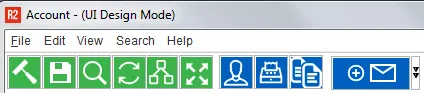
The R2 window title will show (UI Design Mode)
Right-click on any column in the grid and select: More…

Grid Designer window will open upon selecting More…
- Drag-and-drop the columns in the sequence desired.
- Columns can be removed by de-selecting the Visible checkbox.
- The default Width of the column can be changed by entering a value in pixels.
Click the OK icon (green hand icon) to save the column layout
To save the layout for this screen, right click anywhere in the header of the R2 screen and select Save

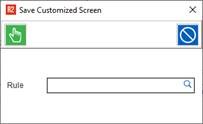
You will be prompted to save the customized screen
If you do not use a specialized screen selection, click on the OK icon (green hand icon)